Rack CZ-10 · Contact actions bar
A GHL contact actions bar for the jobs your team repeats
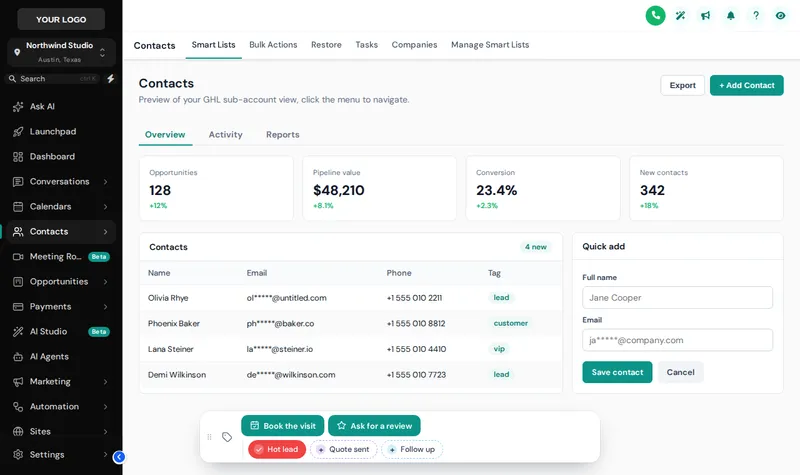
Staff open a contact to do one of the same five things. The actions bar puts those five things on the contact page as buttons and quick tags, so tagging a hot lead or logging a job value is one tap, not four menus.
Stock
- Tags added through a dropdown, when remembered
- Custom fields edited one by one
- Workflows that never get their trigger
Off the shelf
- One-tap quick tags with colours
- A short form that fills several fields
- Triggers fired every time
Straight answer
What is the GHL contact actions bar?
The contact actions bar is a strip of buttons and quick tags pinned to the GoHighLevel contact page. A quick tag adds or removes a tag in one tap, which can start a workflow; a button can open a short form that writes straight into custom fields. It is part of Depot Plus and Depot Max.
- bar positions
- 6
- tap to tag a contact
- 1
- chip colour modes
- 3
- extra code to install
- 0
Figures checked against the customizer catalogue on .
Live bay
Press the buttons
This is the real actions bar on a copy of the contact page. Tap a quick tag, open Update job, or drag the bar. Change the chip colours, what it shows and where it sits.
Loading the live preview
A colour per tag The real contact actions bar. Tap a quick tag to add or remove it, press Update job to open its form, or drag the bar by its grip. Nothing is saved in the preview; inside GoHighLevel the contact updates straight away.
Before and after
Four menus to do one thing
Tagging a contact so a workflow fires takes several clicks in stock GoHighLevel, and staff skip it when they are busy. The workflow your crate set up never starts. A button on the page makes the right thing the easy thing.
Stock GoHighLevel
- Tags added through a dropdown, when remembered
- Custom fields edited one by one
- Workflows that never get their trigger
- Different habits on every desk
With the contact actions bar rack
- One-tap quick tags with colours
- A short form that fills several fields
- Triggers fired every time
- The same buttons on every contact
Rack CZ-10
What the actions bar holds
Quick tags
Chips that add or remove a tag in one tap, coloured per tag, by brand, or green when added and grey when not.
Field forms
A button opens a short form (number, date, select, text) that writes straight into the contact's custom fields.
Workflow starters
Because tags trigger workflows, a button can start a booking, review or follow-up sequence you already have.
Position and drag
6 positions, top or bottom, and users can drag it out of the way.
Confirmation messages
Each action shows its own confirmation so staff know it worked.
Inside any theme
The bar takes the account's theme colours, so it looks native on every client.
On the depot floor
How agencies on these aisles use it
Written for the trades this depot stocks crates for. Each card links to the aisle it comes from.
- Home and tradeBook the visit, log the valueAn office manager taps Book the visit to start the scheduling workflow and logs the job value in the same breath.
- Health and wellnessReview request after the visitA front desk taps Ask for a review as the patient leaves, which starts the review workflow from the crate.
- Professional servicesQualify in one formAn intake team fills budget, decision date and source in one small form instead of hunting through custom fields.
- AgenciesSame buttons on every deskEvery client team gets the same actions, so your training video matches what they see.
Which package
Unlocked from Depot Plus
Contact actions bar need Depot Plus or above. All three are one-time payments with lifetime access.
Three moves
Setting up contact actions bar, start to finish
Log in
Your login is emailed as soon as payment clears, usually within minutes and never more than 24 hours. The actions bar is in Depot Plus and Depot Max.
Add your actions
Create quick tags and buttons, set which tags they add or remove and which custom fields a form fills.
Save
It appears on contact pages through the loader line already installed.
Questions
About contact actions bar
What does the contact actions bar do?
It adds buttons and quick tags to the GoHighLevel contact page. A quick tag adds or removes a tag in one tap; a button can add tags or open a short form that updates custom fields.
Which package includes the actions bar?
Depot Plus at $449 one time, and Depot Max.
Can a button start a GoHighLevel workflow?
Yes, through tags. Set the button to add a tag that a workflow uses as its trigger, and pressing the button starts it.
Which custom field types can a form fill?
Number, date, select and text fields, mapped to the contact's existing custom fields.
Can staff move the bar?
Yes. It can sit in 6 positions and users can drag it by its grip; the position is remembered on that device.
Does the preview above save anything?
No. The preview runs the real bar on a sample page and nothing is stored. Inside GoHighLevel, actions update the contact straight away.
Can I colour the tags?
Yes. A colour per tag, all in your brand colour, or green when the tag is on and grey when it is off.
Does it replace GoHighLevel's own contact tools?
No. It sits on top of the contact page as a shortcut. Everything in GoHighLevel's own panels still works as before.
Next racks
Usually picked alongside
- CZ-07From Depot PlusMenus and navigation
- CZ-08From Depot PlusDashboard designs
- CZ-09From Depot PlusOpportunities board designs
- All ten racks on the GHL customizer overview
- GHL customizer pricing, line by line
- The two-line install guide
- Snapshot crates for the system underneath
DFY Depot is independent and not affiliated with HighLevel Inc. GoHighLevel and HighLevel are trademarks of their owner. The GHL Customizer is delivered through GoHighLevel's own custom code settings.
Rack CZ-10
Take contact actions bar off the shelf
Contact actions bar come with Depot Plus and above, from $449 paid once. Login emailed within minutes (max 24 hours).
- Login emailed within minutes (max 24 hours)
- One-time payment, lifetime access
- Installed with one line, about 2 minutes